[](https://opensource.org/licenses/MIT)
[](https://gpuopen-professionalcompute-libraries.github.io/rpp/)

> [!NOTE]
> The published documentation is available at [ROCm Performance Primitives (RPP)](https://rocm.docs.amd.com/projects/rpp/en/latest/index.html) in an organized, easy-to-read format, with search and a table of contents. The documentation source files reside in the `docs` folder of this repository. As with all ROCm projects, the documentation is open source. For more information on contributing to the documentation, see [Contribute to ROCm documentation](https://rocm.docs.amd.com/en/latest/contribute/contributing.html).
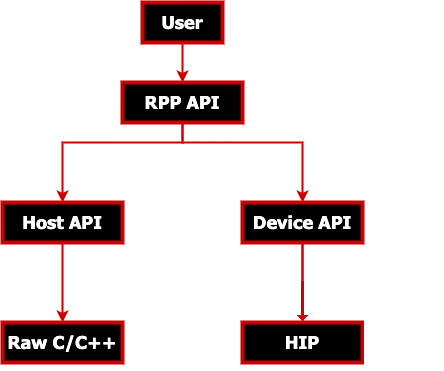
AMD ROCm Performance Primitives (RPP) library is a comprehensive, high-performance computer
vision library for AMD processors that have `HIP`, or `CPU` backends.
#### Latest release
[](https://github.com/ROCm/rpp/releases)
## Supported Augmentations / Primitives
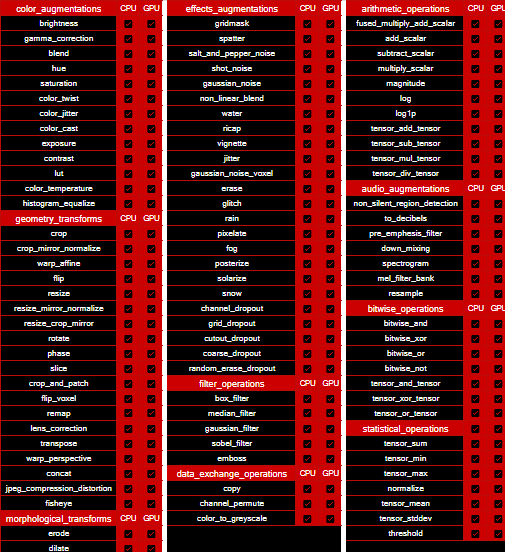
RPP supports various 2D image, 3D image (voxel), audio and miscellaneous augmentations and primitives as listed below.
## Supported 2D Image Augmentations Samples

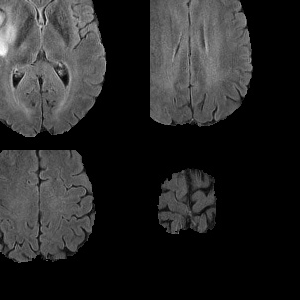
## Supported 3D Image Augmentations Samples
| | Input
(3D voxel image) | |
|:-------------------------:|:-------------------------:|:-------------------------:|
| |  | |
| add_scalar
(3D scalar addition) | subtract_scalar
(3D scalar subtraction) | multiply_scalar
(3D scalar multiplication) |
|  |  |  |
| fused_multiply_add_scalar
(brightened 3D image) | gaussian_noise
(3D noise augmentation) | flip
(3D flip augmentation) |
|  |  |  |
slice (3D slice - 100x200 from 240x240x155):

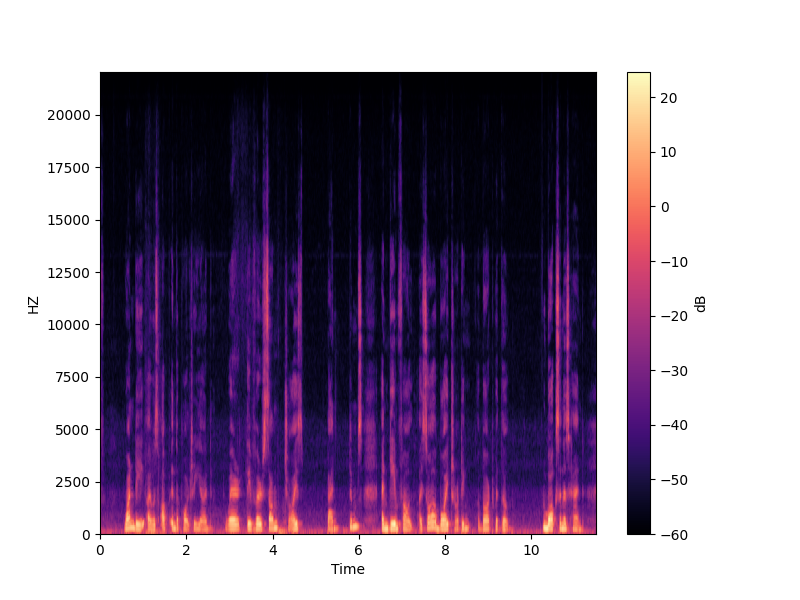
## Supported Audio Augmentations Samples
Spectrogram functionality output represented as an image:
## Prerequisites
### Operating Systems
* Linux
* Ubuntu - `22.04` / `24.04`
* RedHat - `8` / `9`
* SLES - `15 SP7`
### Hardware
* **CPU**: [AMD64](https://rocm.docs.amd.com/projects/install-on-linux/en/latest/reference/system-requirements.html)
* **GPU**: [AMD Radeon™ Graphics](https://rocm.docs.amd.com/projects/install-on-linux/en/latest/reference/system-requirements.html) / [AMD Instinct™ Accelerators](https://rocm.docs.amd.com/projects/install-on-linux/en/latest/reference/system-requirements.html)
> [!IMPORTANT]
> * [ROCm-supported hardware required for HIP backend](https://rocm.docs.amd.com/projects/install-on-linux/en/latest/reference/system-requirements.html)
> * `gfx908` or higher GPU required
* Install ROCm `7.0.0` or later with [amdgpu-install](https://rocm.docs.amd.com/projects/install-on-linux/en/latest/how-to/amdgpu-install.html): **Required** usecase:`rocm`
> [!IMPORTANT]
> `sudo amdgpu-install --usecase=rocm`
### Compiler
* AMD Clang++ Version 18.0.0 or later - installed with ROCm
> [!NOTE]
> * For CPU only backend use Clang Version `5.0.1` or later
> ```shell
> sudo apt install clang
> ```
> * To use GNU compiler or custom compilers use `-D CMAKE_CXX_COMPILER` during build
### Libraries
* CMake Version `3.10` or later
```shell
sudo apt install cmake
```
* HIP
```shell
sudo apt install hip-dev
```
* OpenMP
```shell
sudo apt install openmp-extras-dev
```
* Half-precision floating-point library - Version `1.12.0` or later
```shell
sudo apt install half
```
> [!IMPORTANT]
> * Required compiler support
> * C++17
> * OpenMP
> * Threads
> * On Ubuntu 22.04 - Additional package required: libstdc++-12-dev
> ```shell
> sudo apt install libstdc++-12-dev
> ```
>[!NOTE]
> * All package installs are shown with the `apt` package manager. Use the appropriate package manager for your operating system.
## Installation instructions
The installation process uses the following steps:
* [ROCm-supported hardware](https://rocm.docs.amd.com/projects/install-on-linux/en/latest/reference/system-requirements.html) install verification
* Install ROCm `7.0.0` or later with [amdgpu-install](https://rocm.docs.amd.com/projects/install-on-linux/en/latest/how-to/amdgpu-install.html) with `--usecase=rocm`
> [!IMPORTANT]
> Use **either** [package install](#package-install) **or** [source install](#source-install) as described below.
### Package install
Install RPP runtime, development, and test packages.
* Runtime package - `rpp` only provides the rpp library `librpp.so`
* Development package - `rpp-dev`/`rpp-devel` provides the library, header files, and samples
* Test package - `rpp-test` provides CTest to verify installation
> [!NOTE]
> Package install will auto install all dependencies.
#### Ubuntu
```shell
sudo apt install rpp rpp-dev rpp-test
```
#### RHEL
```shell
sudo yum install rpp rpp-devel rpp-test
```
#### SLES
```shell
sudo zypper install rpp rpp-devel rpp-test
```
### Source build and install
* Clone RPP git repository
```shell
git clone https://github.com/ROCm/rpp.git
```
#### HIP Backend
```shell
mkdir build-hip
cd build-hip
cmake ../rpp
make -j8
sudo make install
```
### Running Tests
After installing RPP, refer to the [Verify installation](#verify-installation) section below for instructions on running tests.
## Verify installation
The installer will copy
* Libraries into `${ROCM_PATH}/lib`
* Header files into `${ROCM_PATH}/include/rpp`
* Samples, and test folder into `${ROCM_PATH}/share/rpp`
* Documents folder into `${ROCM_PATH}/share/doc/rpp`
### Verify with rpp-test package
Test package will install CTest module to test rpp. Follow below steps to test package install
```shell
mkdir rpp-test && cd rpp-test
cmake ${ROCM_PATH}/share/rpp/test/
ctest -VV
```
> [!NOTE]
> * **Ubuntu**: Install Nifti-Imaging to run all tests
> ```
> git clone https://github.com/NIFTI-Imaging/nifti_clib.git
> cd nifti_clib
> git reset --hard 84e323cc3cbb749b6a3eeef861894e444cf7d788
> mkdir build && cd build && cmake ..
> sudo make -j$nproc install
> ```
> * **SLES/RHEL**: Install [prerequisites](utilities/test_suite#prerequisites) to run all tests
## Test Functionalities
To test latest Image/Voxel/Audio/Miscellaneous functionalities of RPP using a python script please view [AMD ROCm Performance Primitives (RPP) Test Suite](utilities/test_suite/README.md)
## Adding RPP to your CMake project
To add RPP to your CMake project, you can use the following code after installation:
```cmake
find_package(rpp REQUIRED)
target_link_libraries(your_target PRIVATE rpp::rpp)
```
HIP backend support is automatic: `rpp::rpp` transitively propagates the HIP include paths and link libraries, and `rpp/rpp.h` includes `rpp_backend.h` which sets `RPP_BACKEND_HIP` for your compiled sources.
> [!NOTE]
> `find_package(rpp REQUIRED)` sets the following variables in your CMake project:
> * `rpp_BACKEND_TYPE` - "HIP" or "CPU" — useful for conditional CMake logic (e.g. adding HIP-specific sources)
> * `rpp_AUDIO_AUGMENTATIONS_SUPPORT` - ON or OFF
> [!TIP]
> If CMake is unable to find RPP, the following fixes can be tried:
> * Ensure `${ROCM_PATH}/bin` is in your `PATH`: `export PATH=${ROCM_PATH}/bin:$PATH`.
> * Ensure `CMAKE_PREFIX_PATH` includes `${ROCM_PATH}/lib/cmake`.
## MIVisionX support - OpenVX extension
[MIVisionX](https://github.com/ROCm/MIVisionX) RPP extension
[vx_rpp](https://github.com/ROCm/MIVisionX/tree/master/amd_openvx_extensions/amd_rpp#amd-rpp-extension) supports RPP functionality through the OpenVX Framework.
## Technical support
For RPP questions and feedback, you can contact us at `mivisionx.support@amd.com`.
To submit feature requests and bug reports, use our
[GitHub issues](https://github.com/ROCm/rpp/issues) page.
## Documentation
You can build our documentation locally using the following code:
* Sphinx
```bash
cd docs
pip3 install -r .sphinx/requirements.txt
python3 -m sphinx -T -E -b html -d _build/doctrees -D language=en . _build/html
```
* Doxygen
```bash
doxygen .Doxyfile
```
## Release notes
All notable changes for each release are added to our [changelog](CHANGELOG.md).
## Tested configurations
* Linux distribution
* Ubuntu - `22.04` / `24.04`
* RedHat - `8` / `9`
* SLES - `15 SP7`
* ROCm: rocm-core - `7.0.0`+
* CMake - Version `3.10`+
* AMD Clang++ - Version `18.0.0`+
* Half - IEEE 754-based half-precision floating-point library - Version `1.12.0` / package V`1.12.0`
* OpenCV - [4.6.0](https://github.com/opencv/opencv/releases/tag/4.6.0)