 derek.holloway
7502bf64a4
derek.holloway
7502bf64a4
14 KiB
Contributing to TheRock
We are enthusiastic about contributions to our code and documentation. Please feel free to file issues where documentation or functionality is lacking or, even better, volunteer to contribute to help close these gaps!
Developer policies
These policies apply to all forms of activity and engagement in this project.
Important
AMD employees must also follow the ROCm open source software contributing policies at http://u.amd.com/rocm-oss-policies.
Project governance
See ROCm Project Governance, which also defines the code of conduct.
Licensing
Code contributions to this project are covered under the terms of the LICENSE file.
Communication channels
TheRock uses GitHub as the source of truth for all issue tracking, project planning, and code contributions. This makes it easy for developers across companies to observe the project and contribute. We also leverage an open source stack for our development tools and infrastructure so that forks and downstream projects can benefit too.
We are also active on the
AMD Developer Community Discord Server
in channels like #therock-contributors and #rocm-build-install-help.
AI tool use policy
We allow the use of AI tools to help author issues, pull requests, reviews, comments, and more.
While we don't have a formal AI tool use policy in the ROCm GitHub organization at the moment, we are actively monitoring contribution patterns and take inspiration from policies in neighboring ecosystem projects:
Of particular note, from the LLVM AI Tool Use Policy:
The contributor is always the author and is fully accountable for their contributions. Contributors should be sufficiently confident that the contribution is high enough quality that asking for a review is a good use of scarce maintainer time, and they should be able to answer questions about their work during review.
When posting significant portions of AI-generated content on issues or pull requests, we also encourage contributors to clearly disclose which sections of a comment are human or AI-generated (e.g. using a code or quote block, or by posting the output to https://gist.github.com/) along with accompanying human commentary explaining the relevance and accuracy of the content.
Tip
If you use an AI coding assistant, this repository includes several PR-quality "skills" that help you author and review changes. See
skills/for the full index:
skills/rocm-pr-quality/: the ROCm-wide base (start here).skills/therock-pr-quality/: TheRock overlay for changes to this specific repository.
Branch creation policy
Most contributions from AMD employees should be made via branches in the shared repository and not personal forks according to the http://u.amd.com/rocm-oss-contributing policy. Branches in the shared repository benefit from code security scanning, code quality tooling, and easier collaboration.
For external contributors, PRs from forks are of course accepted and most workflows are compatible with this contribution model.
Note
One notable exception is that GitHub Actions workflows using our self-hosted runners can only be triggered using workflow_dispatch from branches in the shared repository, so if a change requires more extensive testing than what our standard CI workflows provide then a branch in the shared repository may need to be created.
Branch naming policy
Branches in personal forks can use any name.
Branches created in the shared repository should match one of these patterns so branches are easily sortable and can be audited by repository maintainers:
| Branch name pattern | Example |
|---|---|
users/[USERNAME]/[feature-or-bug-name] |
users/cooldeveloper/my-feature |
shared/[feature-or-bug-name] |
shared/kpack-integration |
A few exceptions are granted for automation and some subproject-specific branch naming conventions:
bump-*revert-*dependabot/**/*copilot/**/*compiler-*amd-compiler-*amd/dev/**/*amd/staging/**/*
Additionally, a few long-lived branches exist using other patterns:
Branch naming is enforced via a branch protection ruleset that restricts branch creation (specifically this ruleset for maintainers).
Development workflows and contributing guide
Using GitHub Issues for bug reporting
Before filing a new issue, please search through existing issues to make sure your issue hasn't already been reported.
General issue guidelines:
- Use your best judgement for new issue creation. If you find a similar open (or closed) issue already reported, upvote the issue and leave a comment with any new details, such as how you reproduced it.
- When filing an issue, be sure to provide as much information as possible, including reproduction steps and complete script output so we can triage efficiently.
- Check your issue regularly, as we may require additional information to resolve the issue.
Using GitHub Issues for feature development
Discussion about new features is welcome via
- Filing a GitHub issue
- Posting a GitHub discussion
- Reaching out on Discord
Tip
When planning complex changes, please solicit feedback and announce your intent to work on a pull request early in development, as this gives other contributors time to offer advice and avoid duplicating effort.
Creating pull requests
To keep code quality high across the project, we hold pull requests to the following standards:
| Check description | Enforced via | Details |
|---|---|---|
| ✅ Code style guidelines |
|
|
| ✅ Branch naming patterns |
|
|
| ✅ Pull requests should link an issue |
|
|
| ✅ Lint pre-commit checks | ||
| ✅ Changes should be unit tested |
|
Note
For more information about the PR Policy Bot which enforces some of these policies see
therock_pr_bot/FAQ.md.
Coding style guides
We have project-wide style guides with recommendations to follow at
docs/development/style_guides/:
Improvements to the style guides are welcome, particularly for common patterns observed across multiple commits.
Tip
These style guides are intended for both human developers and AI agents.
The repository's
CLAUDE.mdreferences them, as do the PR-quality skills for AI agents underskills/. Following these guides during agent-driven development can help produce higher-quality contributions that are easier for maintainers to review.
Linking pull requests to GitHub issues
All pull requests should be associated with at least one GitHub issue.
This lets reviewers see the context for contributions, helps link bugs and their fixes together, and helps with release planning. See also the Using GitHub Issues for bug reporting and Using GitHub Issues for feature development sections above.
- The repository
pull_request_template.mdhas a section for this. - Our PR Policy Bot enforces this by checking for references in the pull request
description such as:
See the "PR Description" section of
Fixes https://github.com/ROCm/TheRock/issues/123therock_pr_bot/FAQ.mdfor full details. - Contributions by AMD employees may also/instead reference a JIRA ID, though GitHub issues are preferred for open source development.
- Exceptions may be granted on a case-by-case basis via the PR Policy Bot.
pre-commit checks
We use pre-commit to run automated "hooks" like lint
checks and formatters on each commit. See the list of hooks we currently
run at .pre-commit-config.yaml. Contributors are
encouraged to download pre-commit and run it on their commits before sending
pull requests for review.
Tip
The pre-commit tool can also be "installed" as a git hook to run automatically on every
git commit.
For example:
# Download (note: this is already included in requirements.txt).
pip install pre-commit

# Run locally on staged files.
pre-commit run

# Run locally on all files.
pre-commit run --all-files

# Install the git hook.
pre-commit install
Requesting a code review
If you are not looking for a review on a pull request yet, please mark that pull request as a draft:
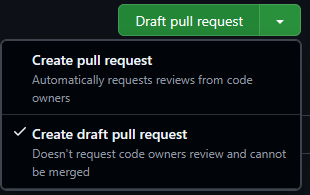
- GitHub Docs: Creating a pull request
- GitHub Docs: Changing the stage of a pull request

When you are ready for a review, please request a review from a maintainer and mark the PR as not a draft as needed:
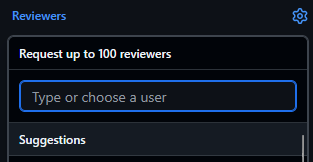

- GitHub Docs: Requesting a pull request review


You can check the git history to see who recently authored or approved PRs in the same files or folders:
- CODEOWNERS
- GitHub Docs: About code owners
.github/CODEOWNERS
- Checking history
- GitHub Docs: Viewing and understanding files
- GitHub Docs: Differences between commit views
Tip
After addressing feedback, please re-request review
this ensures that your pull request shows up for reviewers on dashboards such as https://github.com/pulls/reviews.
